Break reminder app for Windows Healthy at your screen. Never annoying.

Nudge gives you small nudges, for example to drink water, rest your eyes, sit up straight or move a little. So you can keep going at your screen all day, and still feel good at the end of it.

Windows 10 and 11 · set up in 20 seconds · try everything free for 14 days, no account needed
On a Mac? Join the waitlist

Sound familiar?

Long hours at your screen? Your body notices.

Work, email, just one more thing. Before you know it you've been sitting for three hours without standing up, drinking or looking away.

N
Time for some water?Grab your glass and take a sip.
snooze
N
Look away for 20 seconds.Focus on something far away.
snooze
N
Shoulders loose, back straight.Pull your shoulders back.
snooze
N
Time to move.Take a short walk.
snooze
N
Breathe consciously.Breathe in and out calmly.
snooze
N
Blink on purpose.Blink slowly ten times.
snooze
N
Circle your wrists.Make slow circles with your wrists.
snooze
N
Stretch your neck.Slowly turn your head left and right.
snooze
N
Relax your jaw.Let your teeth come apart.
snooze
N
Time for something healthy.Grab some fruit or nuts.
snooze
N
Check your brightness.Match your screen to the light around you.
snooze
+
Your own reminder ProFor example: put your phone away.

No complaints yet? Great. Nudge helps you keep it that way.

Try it yourself

The way you like it

Pick a corner, size, duration and colour, and watch the corner of your screen. That's exactly how the card looks in the app.

Go ahead, click around

Corner
Size
How long
Colour

Why Nudge is different

A nudge, not an interruption

Never annoying

No full-screen breaks that block your work. Nudge shows a small card in the corner. Not a good time? Ignore it or snooze it. So you stay fresh without losing your flow.

Knows when to stay quiet

During a presentation, movie or full-screen game, Nudge stays quiet. Step away from your PC and it pauses. Soon during video calls too.

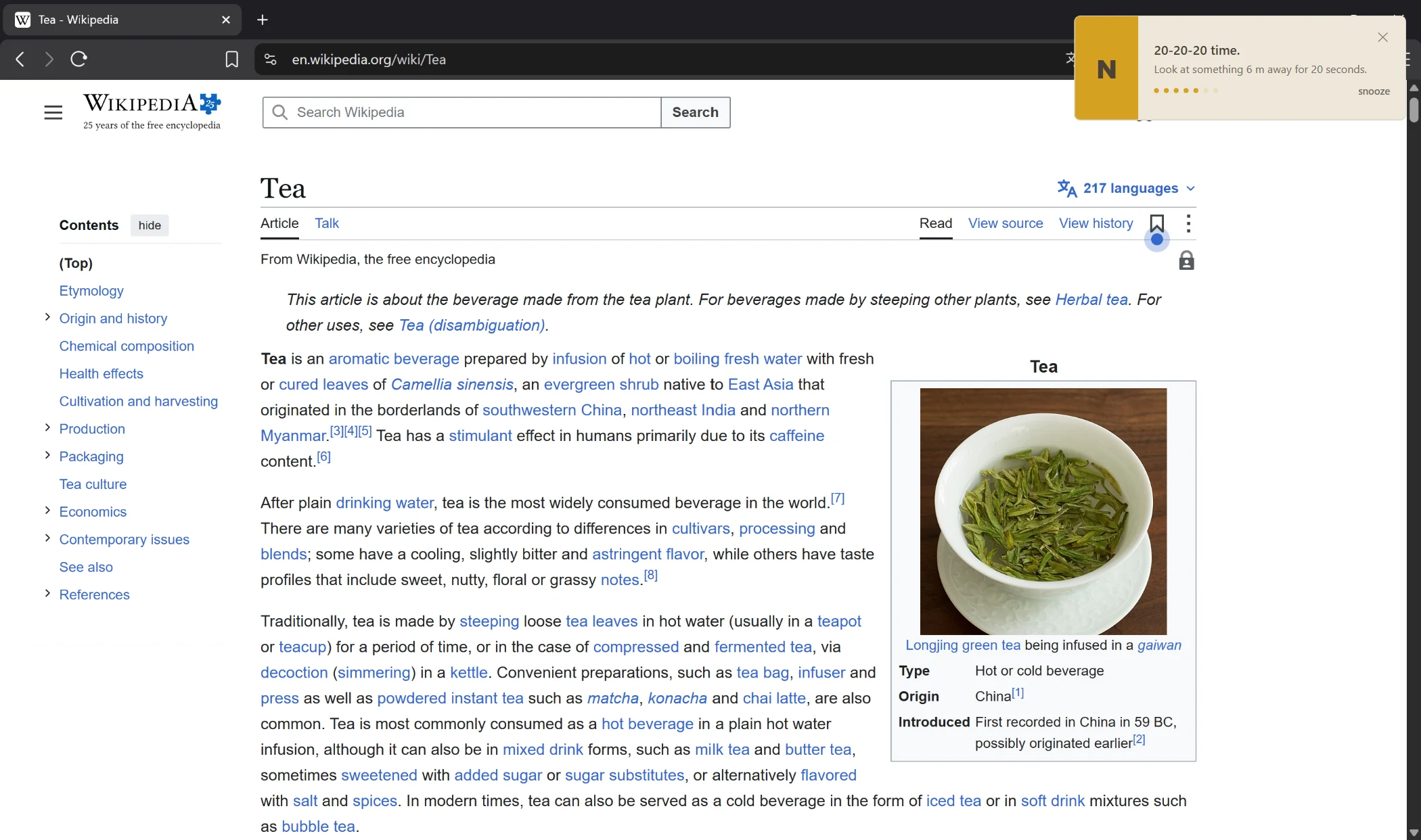
A Nudge card in the top-right corner while reading in the browser.
A nudge in the cornerA small card while you work. Gone with one click, or it fades away on its own.
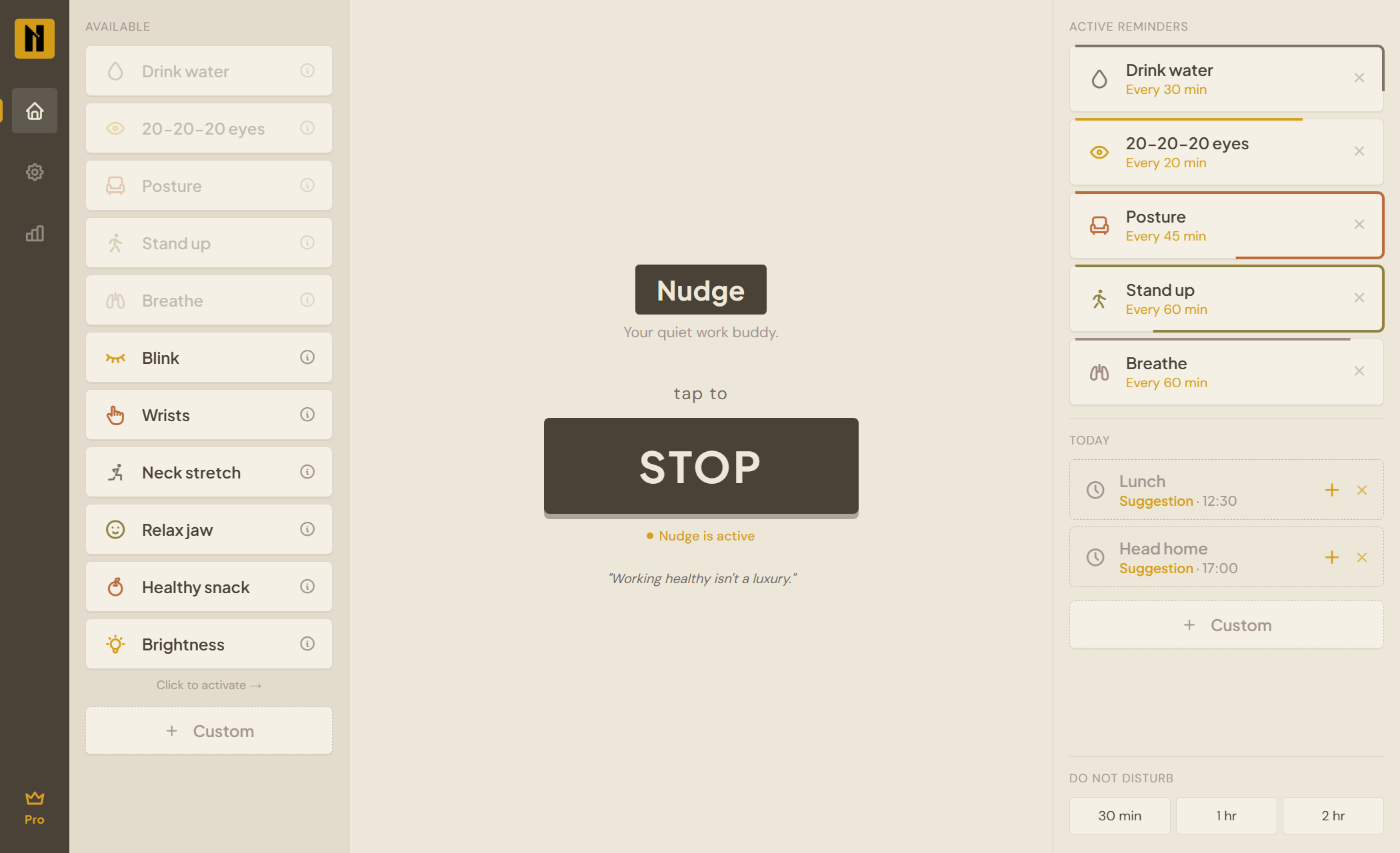
The main screen of Nudge: available and active reminders, with the time until the next nudge.
Everything at a glancePick your reminders and see exactly when the next one is due.

What you get

Everything for a healthier workday

Motivating, without pressure Pro

See what you did well this week and why it helps. No red numbers, no streaks.

Working hours Pro

Pick your days and times. Outside working hours, Nudge leaves you alone.

Reminders

  • 11 ready-made reminders: water, eyes, posture, moving and more
  • Each reminder explains why it helps
  • Your own reminders with your own text and interval Pro
  • One-off nudges at a set time, like lunch or your medication Pro
  • Messages rotate, so it never gets repetitive

At the right moment

  • Quiet during full-screen presentations, movies and games
  • Pauses by itself when you step away
  • Do not disturb for 30 minutes, 1 or 2 hours
  • Snooze or skip with one click
  • Only during your work hours Pro

Made your own

  • Card in any corner, in 3 sizes, for 3 to 10 seconds
  • Light or dark theme
  • Sound on or off, with its own volume
  • Runs quietly in the system tray and can start with Windows
  • Weekly progress without streaks Pro
  • In English, Dutch and Spanish

Private

Your reminders and progress stay on your own PC. Use it free without an account; Pro only needs an email address.

Light and offline

Works without internet and you won't notice it on your system.

Trusted install

Download here, or soon from the Microsoft Store. The download still shows a Windows SmartScreen notice.

Pricing

Start free, upgrade when you love it

You get everything for 14 days. After that Nudge stays free with 3 reminders at a time, or you choose Pro.

You pay in the currency you pick here.

Monthly

$2.99
per month
  • All reminders at once
  • Custom and fixed-time reminders
  • Working-hours schedule
  • Weekly progress
  • On 3 PCs at once
  • Cancel anytime
Coming soon
Recommended

Yearly

$17.99
per year · save 50%
  • All reminders at once
  • Custom and fixed-time reminders
  • Working-hours schedule
  • Weekly progress
  • On 3 PCs at once
  • Cancel anytime
Coming soon

Lifetime

$39.99
one-time, forever
  • All reminders at once
  • Custom and fixed-time reminders
  • On 3 PCs at once
  • All updates
  • No subscription
Coming soon

Free stays free: 3 reminders at a time, smart quiet mode and notifications, forever.

Frequently asked questions

How do I activate Pro?

After paying you receive a license key by email. Open Nudge, click the crown in the bottom left and paste the key under "I already have a license key".

Where do I find Nudge after installing?

Nudge runs quietly in the system tray, at the bottom right by the clock (sometimes behind the little arrow). Click the icon to open Nudge, or right-click for pause or do not disturb. Turn on "Start with Windows" in Settings and Nudge starts by itself when you sign in.

I got Nudge from the Microsoft Store. Can I get Pro too?

Yes. Pro works the same in the Store version and the version from this website. Buy on this site and enter the key in the app.

How do I cancel my subscription?

In Nudge via the crown → "Manage subscription", or via the link in your purchase email. You keep Pro until the end of your paid period.

What happens after the trial?

Nothing disappears. You keep 3 reminders on at a time. With Pro everything is back the way it was instantly.

Why does Windows show a warning when installing?

New programs sometimes get a SmartScreen notice until they've been downloaded enough. Click "More info" → "Run anyway". Prefer not to? Install from the Microsoft Store.

What data does Nudge collect?

Your settings and progress stay on your PC. Nudge only connects to check for updates, to check your license if you have Pro, and to send anonymous usage statistics, which you can turn off in the settings. See the privacy policy.

Nudge for Mac

Rather use it on your Mac?

Nudge is Windows-only for now. If enough people ask, we will build a Mac version. Leave your email and you will be the first to know.

You get one email when Nudge for Mac is ready. No newsletter, no spam.

Ready for a healthier workday?

Free to download and set up in 20 seconds.

Download free